
A modern console for the Hermes Lite 2
Kainos is free, open-source SDR software for Windows. Everything you know from Thetis, with a clean dark layout and the tools you'd normally bolt on — FreeDV RADE, RTTY, CW, spots and KiwiSDR — built right in.
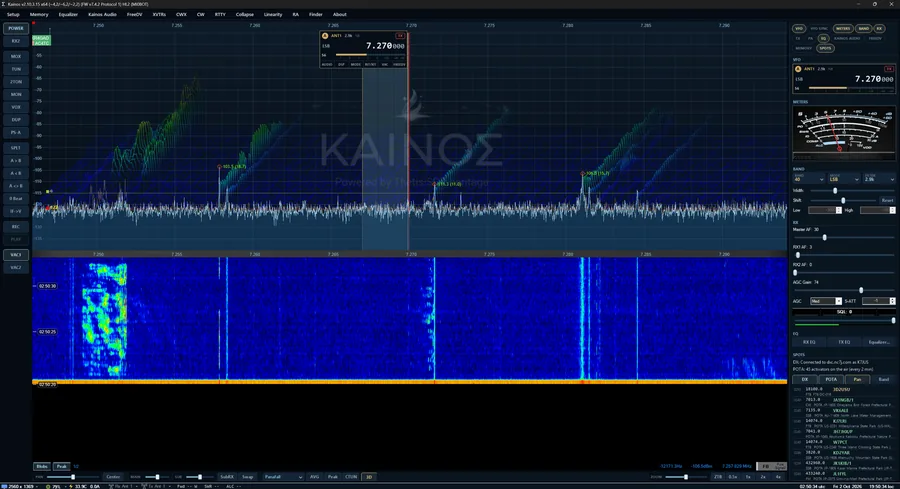
Everything on one screen
Kainos keeps the proven Thetis and WDSP core, then removes the clutter and the extra programs. Open a mode, click a spot, transmit.
A modern layout
SmartSDR-style VFO flags on the panadapter, a right-hand column of tabs you arrange yourself, and a full-height panadapter and waterfall.
RADE V1 + V2FreeDV RADE digital voice
Press RADE and talk. Decode straight to speech on RX1 or RX2, with FreeDV Reporter built in. No FreeDV-GUI, no audio cables.
DX cluster & POTA spots
Callsign tags with flags right on the panadapter. Click one to tune. Logs into the cluster with your callsign automatically.
RTTY & CW terminals
Decode and send with macros, type-ahead and a tuning indicator. The CW decoder follows the sender's speed.
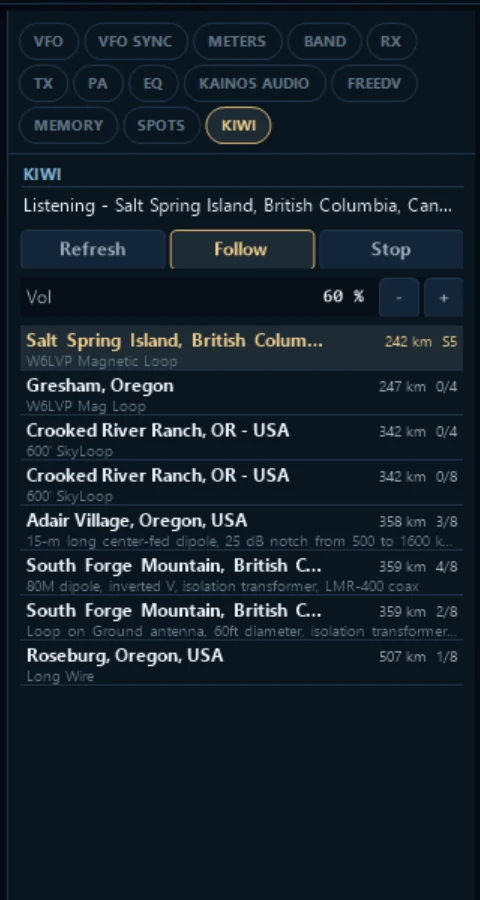
KiwiSDR, built in
Listen to the nearest public KiwiSDRs following your VFO — with their panadapter and waterfall, even with the HL2 off.
Kainos Audio
EQ, gate, compressor, tube saturation and the AetherVoice exciter on receive and transmit. VST3 plugins, too (experimental).
Tune from the panadapter
Each VFO gets a see-through flag with antenna, filter, DSP, mode, frequency and an S-meter. Roll the mouse wheel over a digit to tune by that digit, click the frequency to type one, click TX to pick the transmit VFO.
- Drag it anywhere so spots along the top stay visible, or pin it and shrink it to one line.
- Tabs under the flag open its audio, DSP, mode, RIT/XIT, VAC and FreeDV controls.
- Hear VFO B in split — LISTEN puts a second receiver on it, so you hear the pileup and the DX together.
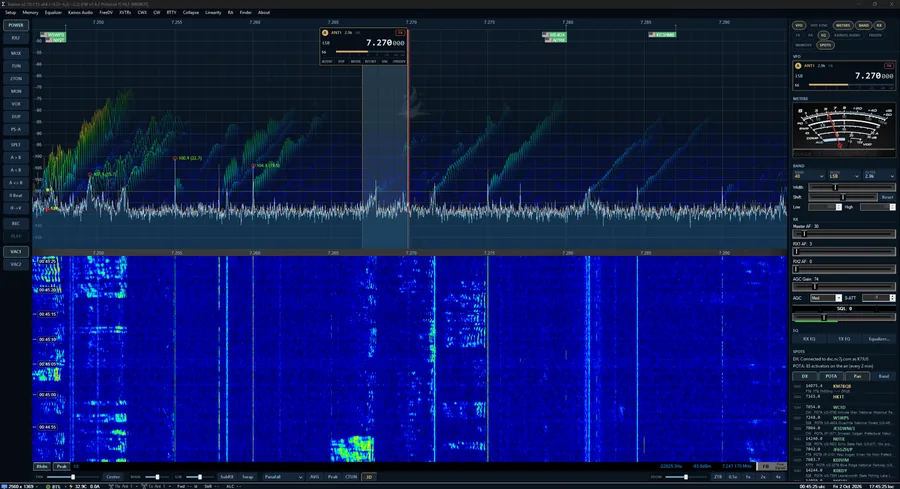
Turn on only what you use
The right-hand column is a set of tabs you switch on and off and drag into your own order. Compact view tucks the side columns into the window's edges until you point at them.
Keep Thetis. Try Kainos.
Kainos installs and runs separately, so both can live on the same PC. On first run it offers to copy your Thetis databases, meters, skins and cmASIO settings — your Thetis install is never touched.
Your logger still works
Kainos identifies itself as Thetis to TCI and TCP CAT clients, so logging and contest software that supports Thetis keeps working.
Your skins still work
Thetis meter skins work in Kainos. The Classic look is one switch away in Setup > Appearance > Kainos.
Separate settings
Kainos keeps its own settings folder and registry key. Run whichever you like — just one at a time with the radio.
Get on the air with Kainos
One installer. Updates are announced in the app with release notes, and your settings come with you.