
The tools you'd bolt on, built in
Kainos keeps every capability of Thetis and the WDSP engine, then adds a modern layout and the operating tools that usually mean another program and a pair of virtual audio cables.
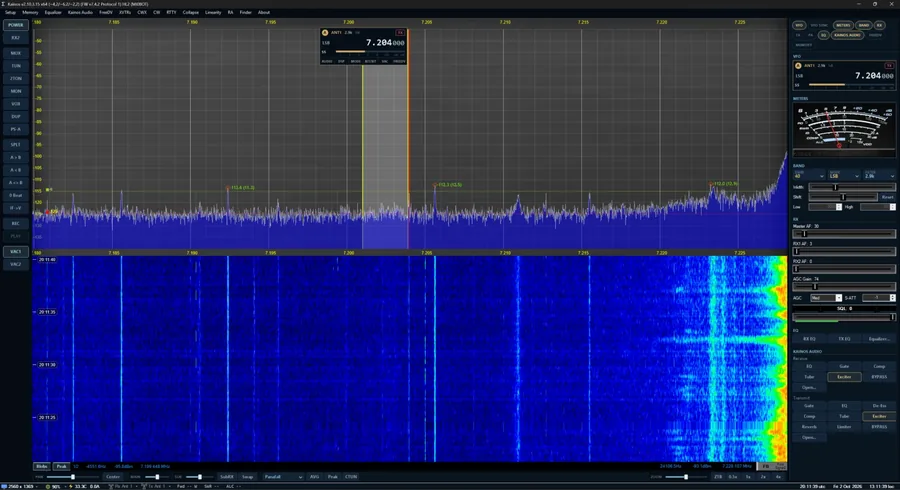
A tidy, dark console with the panadapter front and centre
Everything at the bottom of the Thetis window is gone, so the panadapter and waterfall use the full height. Controls live in two slim columns and a bar under the panadapter.
- Slice flags for VFO A and B on the panadapter: antenna, filter, DSP, mode, frequency and S-meter. Wheel-tune any digit.
- Right-hand column of tabs you switch on, off and drag into order — VFO, meters, band, RX, TX, PA, EQ, memories and more.
- Left-hand column for power, MOX/TUN/2TON, VOX, split, A>B, zero beat, record/play and VAC.
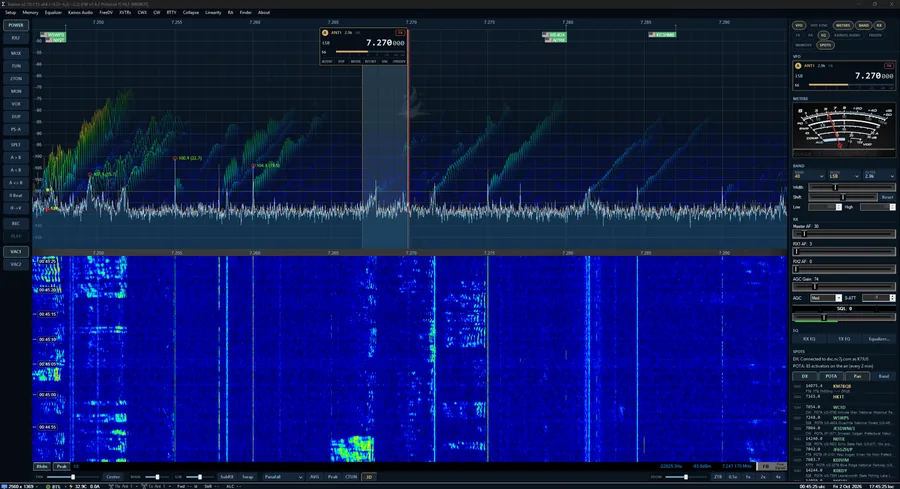
- 3D stacked-trace panadapter (experimental) layers the last few seconds behind the live trace.
- Compact view, UI scale from 75–200%, light mode for slower PCs, and the Classic Thetis look one switch away.
Digital voice with one button
Built-in FreeDV RADE (the Radio Autoencoder, V1 and V2) on RX1, RX2 and the transmitter. Open Modes > FreeDV, pick a receiver, press RADE. Received RADE decodes straight to speech; your overs go out as RADE with your callsign in the end-of-over frame.
No extra software
No FreeDV-GUI and no virtual audio cables. The receiver switches to DIGU/DIGL for you, and the TX compressor, CFC and EQ are bypassed during RADE overs.
Sync, SNR & callsign on screen
While RADE is on, the panadapter shows sync, SNR, level, clip and the last callsign heard. Add RADE readings to any meter container, too.
FreeDV Reporter
See who's on RADE right now, filtered by band or following your frequency. Double-click to tune. Opt in to report your own station — nothing is sent unless you tick the box.
Terminals that open under the panadapter
Open Modes > RTTY or Modes > CW and a terminal appears under the panadapter, or in its own window.
- RTTY at 45.45 baud / 170 Hz shift and others, with type-ahead sending, macros and a tuning indicator.
- CW decoder that listens at your CW pitch and follows the sender's speed.
- CW sending from the keyboard or macros through Thetis's CWX keyer at your chosen speed.
See who's on before you tune
DX cluster and POTA spots appear on the panadapter as callsign tags with flags — click one to tune — and in a SPOTS tab. Kainos logs into the cluster with your callsign automatically.
- Licence-aware band plan along the bottom of the panadapter shows CW, digital and phone segments, and colours where your licence lets you transmit (US and Canada built in).
- Tags at popular frequencies like FT8, FT4 and WSPR.
Listen from across the map
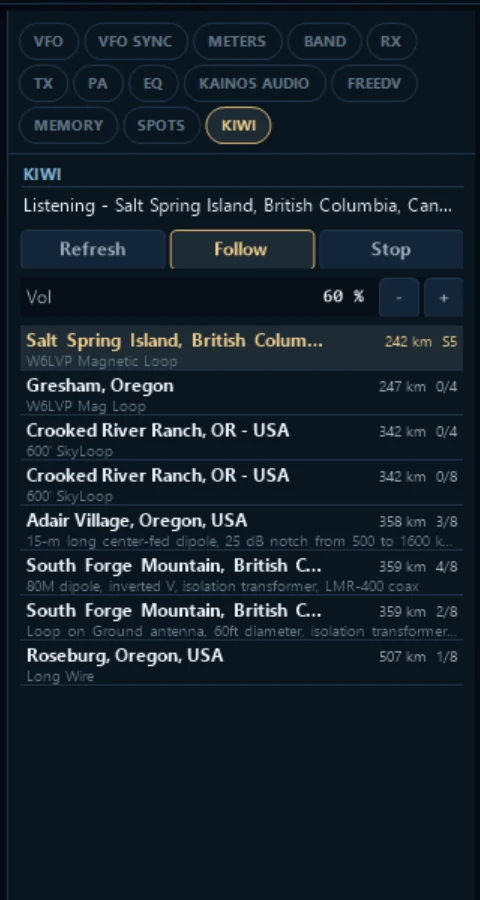
The KIWI tab lists the nearest public KiwiSDRs. Click one to listen — following VFO A, VFO B or tuned on its own — with favourites, search and your choice of output device.
- Waterfall opens the Kiwi's own panadapter and waterfall, with spots and the band plan on it.
- Kiwi as your radio: with the HL2 off, the Kiwi fills the main panadapter and the VFO flag, band lists and mouse wheel drive it.
- Follow A / Follow B lets the Kiwi listen on VFO B while the HL2 stays on VFO A.
Kainos Audio, Audio Scope & plugins
Processing for the voices you hear and your own transmitted voice, in one window with Receive and Transmit tabs. Ported from AetherSDR.
Receive chain
On every receiver: parametric EQ, gate, compressor, tube saturation and the AetherVoice exciter. Saved with your settings.
Transmit chain
Gate, parametric EQ, de-esser, compressor, tube saturation, AetherVoice, reverb and a final limiter. Saved per TX profile.
VST3 plugins
Drop a VST3 plugin anywhere in the transmit chain, with its own editor window. Plugin state is saved and restored.
Audio Scope
Waveform, audio spectrum and waterfall of what you hear — and of your own signal on transmit — in Standard, Kainos glow, Phosphor, Heat or Spectrum colours.
Small things that save an evening
SWR sweep
Sweep a band at 1 W or less and plot your antenna's SWR with the 2:1 bandwidth. Save sweeps to compare, or export CSV.
Amplifier band switching
A Xiegu GPA100 follows Kainos's band over Bluetooth CI-V. Other amps that follow an Icom radio over CI-V can too.
Setup wizard
Callsign, HL2 boards (N2ADR, I/O board), PC audio and look in a few steps. Nothing changes until you press Apply.
Hear VFO B in split
LISTEN on VFO B's flag puts a second receiver on it inside RX1's span — hear the pileup and the DX together.
Safety nets
One-click settings backup, an update notice with release notes, and Report a bug, which opens a GitHub issue with diagnostics filled in.
Every window, dark
Setup, Memory, Equalizer and the rest open in the Kainos look. Sliders and menus look the same on every PC.
Try it next to Thetis
Kainos installs separately and can import your Thetis settings on first run.